
8.1 KiB

Orbit
A modern, pluggable IRCv3 web client. TypeScript · React · Vite · zustand. Installable as a PWA, re-brandable without a rebuild.






Live demo · Documentation · Project page · License
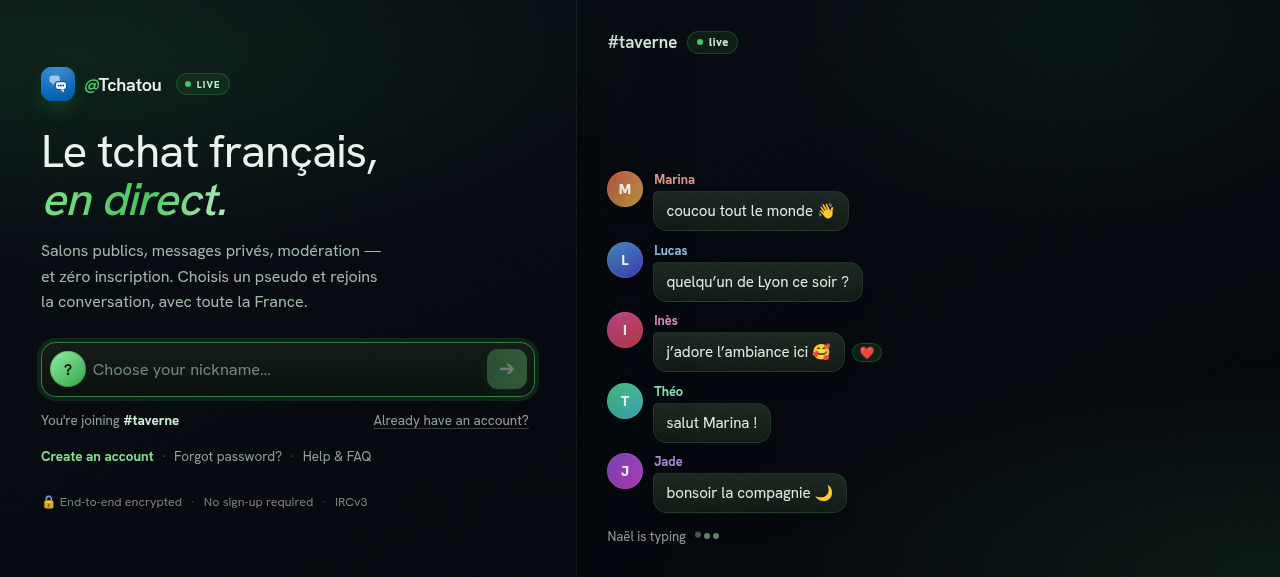
Orbit is a bespoke IRCv3 web client built from scratch, with no wrappers and no
bridge. It speaks modern IRCv3 directly over a WebSocket and presents it as a
polished, app-like chat experience: rich messages, reactions, replies, history,
web push, themes and full internationalization. It powers
tchatou.fr in production, and can be re-pointed at any
IRCv3 network and fully re-branded by editing a single runtime config.json,
with no rebuild required.
🚧 Status
Work in progress. Orbit is under active development. It runs in production, but the UI, config keys and internal APIs are still evolving and may change without notice between commits. Bug reports and contributions are welcome.
✨ Features
- Real IRCv3: negotiates 25 capabilities including chat history, message redaction (edit/delete), multiline, reactions, replies, account registration and SASL, server-time, away/typing and web push.
- Multi-network: connect to several IRC networks at once, each with its own buffers, identity and settings, and switch between them from the network bar.
- Rich composer: bold/italic/underline and mIRC colours, an emoji picker,
:emoji:/@nick//commandtab-completion, multiline, image upload (paste and drag-drop), and per-channel drafts. - Conversations: channels and DMs, a member list with roles, whois/profile panels, friends with online alerts, channel admin (modes, bans, topic), and link/image/YouTube unfurling.
- Installable PWA: an offline app shell via a service worker, plus Web Push notifications (RFC 8291 / VAPID) that work even when the app is closed.
- Themes: Light, Dark, Orbit, Orbit Dark, and a classic yomIRC skin (light and night).
- Settings that surface the protocol: a live Server panel (network, software, TLS, users, limits, raw ISUPPORT) and an IRCv3 panel showing exactly which capabilities your server supports.
- Fully internationalized: 10 languages, browser-detected and switchable live (see Internationalization).
- Plugins: an experimental, operator-controlled plugin API (
window.Orbit) for events, IRC actions, theming and UI slots. See the plugin docs.
📚 Documentation
Full docs are hosted at orbit.tchatou.fr/docs:
| Overview | what Orbit is, and why |
| Quick start | run your own in a minute |
| Configuration | every config.json option |
| Branding & themes | re-brand without a rebuild |
| Plugin system | the window.Orbit API |
| Compiled plugins | real React plugins |
| Build & deploy | self-hosting |
| IRCv3 capabilities | the protocol features |
| Architecture | how it's built |
There's also a user wiki and an FAQ.
🔌 IRCv3 capabilities
Orbit requests every capability it knows how to use and lights up a live status
panel (Settings → IRCv3) showing what the connected server actually supports.
The full set it negotiates lives in src/core/irc/caps.ts,
including draft/chathistory, draft/event-playback, draft/message-redaction,
draft/multiline, draft/account-registration, draft/webpush, sasl,
server-time, message-tags, echo-message, batch, labeled-response,
multi-prefix, away-notify, chghost, and more.
🚀 Quick start
Requirements: Node 20+ and npm.
npm install
npm run dev        # Vite dev server with HMR
npm run build      # type-check (tsc -b) + production build → dist/
npm run preview    # serve the production build locally
npm run lint       # ESLint
npm run test       # Vitest unit tests
npm run test:e2e   # Playwright, drives the app against a real Ergo IRC server
⚙️ Configuration
Orbit is configured at runtime by config.json, fetched on
startup and deep-merged over built-in defaults. Point it at another IRC network
and fully re-brand it without rebuilding: just edit the deployed file and
reload (the service worker serves it network-first).
→ Configuration docs cover every option, merge rules, and examples (source: CONFIG.md).
{
  "server":   { "url": "wss://irc.example.org/ws/" },
  "startup":  { "channels": ["#lobby", "#help"] },
  "branding": { "name": "ExampleChat", "url": "https://example.org" }
}
📦 Deployment
Static output: copy dist/* (including config.json) to the web root served at
/app/. To change only the config later, edit the deployed /app/config.json
and reload. Full steps in the Build & deploy guide.
🗂️ Project structure
src/
  core/
    irc/        IRCv3 client, parser, capabilities, numerics, modes
    store.ts    zustand store: connection, buffers, messages, actions
    store/      message handler, helpers, persistence
    services/   IRC services logic (NickServ/ChanServ routing, credential masking)
    networks.ts multi-network registry
    i18n/       react-i18next setup and 10 locale files
  components/   chat UI (sidebar, composer, message list, members, modals)
  modules/      the plugin system (the window.Orbit API and sandbox)
  platform/     browser services: notifications, web push, avatars
  themes/       theme stylesheets
  ui/ lib/      theming, formatting, editor helpers
public/         config.json, icons, manifest, service worker
🌍 Internationalization
Every user-facing string is translated across 10 languages: English,
French, German, Spanish, Italian, Portuguese (Portugal & Brazil), Russian,
Turkish and Nepali. The language is browser-detected, persisted, and switchable
live from Settings. Strings live in src/core/i18n/locales/.
🧪 Development & CI
Every push runs the full gate before anything ships: lint (ESLint), unit
tests (Vitest), end-to-end tests (Playwright driving the app against a real
Ergo IRC server), then a production build. Nothing is
deployed unless all of it passes. A Forgejo Actions
workflow example lives in .forgejo/.
📄 License
Licensed under the GNU Affero General Public License v3.0 or later (AGPL-3.0). If you run a modified version of Orbit as a network service, you must make your modified source available to its users. See LICENSE.